Fine Print

A second reader that flags what you would miss in a wall of text.
177 passingone small-model check per long turn, capped12Spot risky assumptions in a long Claude answer
Fine Print checks final main replies longer than 150 words and adds up to four caveats about cost, security, data loss and other assumptions. The note is a second look, not an approval gate.
When to use it
- Read caveats before following a database migration plan.
- Check hidden costs before buying a recommended service.
- Consider customer-visible consequences before changing behavior.
Try it in your session
Read a completed long main reply. If the check succeeds, a compact caveat note appears.
Reopen the notes to review what needs attention.
/fineprintChoose Explain more only when you want a follow-up sent to the main model. Check the reasoning yourself before acting.
Choose the behavior
In /config, choose Fine Print. Set watchFor to cost and security for a narrower review, or use all or none. Set maxChecksPerSession to 10 for a smaller session allowance. Verify the next eligible reply, not a short answer.
watchForReviewed default:cost, security, data-loss, irreversible, customers, assumptions- Choose categories, all or none.
maxChecksPerSessionReviewed default:30Example choice:10- Default shown below; valid range 0-1000. A value of 0 disables checks.
Where it works
Terminal and Desktop note UI is defined in the reviewed source. Other surfaces are not demonstrated here.
Check current platform versions and installation guidanceKnow the limits
- Small-model checks send up to 12,000 characters of reply text plus tool target lines. The reply itself is not masked.
- Checks can miss risks, skip short, failed or subagent replies, or fail when the small model is blocked. The session cap limits check count, not exact spend.
- Explain more sends an explicit follow-up to the main model and uses normal model usage. No caveat is a guarantee that an action is safe.
Reviewed version 0.1.1, source reviewed 2026-10-15. Read the pinned README (8628e8f). This walkthrough describes that version, not a new live Claude Code test. Catalogue updates may describe a newer version.
How it works
Slash commands
/fineprintList the notes Fine Print flagged this session, newest first
Settings
watchForDefault:["cost","security","data-loss","irreversible","customers","assumptions"]- Topics Fine Print flags: cost, security, data-loss, irreversible, customers, assumptions. 'all' means every topic, 'none' turns checks off.
maxChecksPerSessionDefault:30- Spend cap: how many small-model checks Fine Print may run in one session. 0 turns checks off.
Hook events
The prompt
Build me a Claude Code mod called "fine-print": a second reader that flags what I might miss in long replies. What it does- After a turn with a long reply (over about 150 words), ask a small, cheap model to read the reply and a summary of that turn's tool calls, and decide whether there is anything I must know: hidden costs, security or privacy risk, data loss, irreversible actions, impact on customers, or assumptions Claude made without asking.- If there is, show a note above my prompt: a bold one-line headline and up to 4 bullets, with buttons Got it, Explain more (sends a follow-up question into the chat) and Dismiss.Details
A second reader that flags what you would miss in a wall of text.
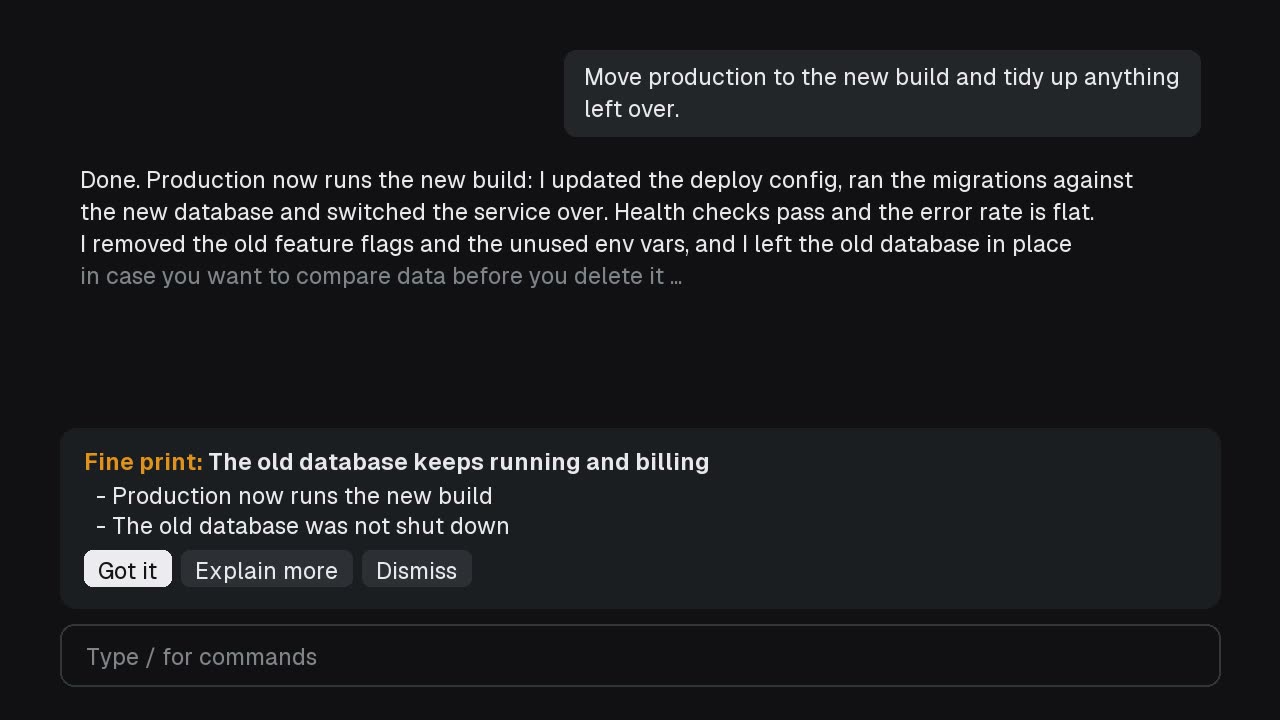
After a long reply, a small, cheap model reads it with a summary of the tool calls behind it. If there is something you must know (a hidden cost, a security or privacy risk, data loss, an action that cannot be undone, an effect on customers, or an assumption made without asking), a short note appears above your prompt. Otherwise it stays silent.
Use it
There is nothing to run. After any reply over 150 words, Fine Print checks it in the background, after the turn has ended.
When it finds something, a band appears above the prompt:
- a bold one-line headline and up to 4 bullets
- Got it (
g): you read it; the band closes - Explain more (click it, or Tab to it and Enter; it has no letter key, so a stray keystroke never sends a message): sends a follow-up question into the chat, so Claude explains the note in plain words. The question is sent as the Fine Print plugin's message, not as yours: the transcript and the model both see that the plugin wrote it, at your press. Claude's answer to it is not checked again.
- Dismiss (
d): closes the band without marking it read
The letter keys (g, d) work once the band has focus (a click, or ctrl+x tab). A newer note replaces the one on screen; the band then says how many older notes are still open.
/fineprint opens a pane (also while Claude is working; Esc closes it) listing every note flagged this session, newest first, with what you did with it (open, got it, dismissed, asked to explain), how long ago, its topics, and how many checks were used.
Settings
Every setting has a default, so the notice at install about options not yet set is expected. Change them in /config (or on the install screen).
| Setting | Default | What it does |
|---|---|---|
watchFor | cost, security, data-loss, irreversible, customers, assumptions | The topics to flag. A list; all means every topic, none turns checks off. Names that match no topic are ignored, and if none are left every topic is watched, so a typo never switches the reader off. |
maxChecksPerSession | 30 | The spend cap: model checks allowed per session (0 to 1000). When it is reached, checks stop and the status line says so once. 0 turns checks off. |
What it can touch
- Model calls: one completion on the
haikumodel per reply over 150 words, at low effort, with at most 1,024 output tokens and a 30 second time limit, and never more thanmaxChecksPerSessionper session. It goes through your session's own client and provider. A failed call counts toward the cap. Nothing is spent in a run where nothing draws (claude -p). - What is sent: the reply as written (whole up to 12,000 characters, beyond that its first 8,000 and last 4,000), including anything it quotes, and up to 40 lines naming this turn's tool calls and their targets: the first line of each command (up to 160 characters), a file or notebook path, a URL, a search pattern or query, a skill name, a subagent type, a tool call's description, and, for messaging tools, the recipient, the subject and the channel name (the
to,subjectandchannelinputs). Nothing else from a tool's input. Before they are sent, secret-shaped strings in those commands and targets (bearer tokens,PASSWORD=orapi_key=values, common API key formats, long hex or base64 strings) are replaced with[hidden]; this is best effort, and the reply itself is not masked. All of it is already in your conversation with the same provider. Never tool output, written file contents or edit text. - Reads: the session transcript, through Claude Code, to find this turn's tool calls. No files, no processes, no network of its own.
- Writes: nothing on disk. Notes and the check count live in the session and end with it.
- Explain more starts one turn of your main model, at its normal cost, and only when you press it.
/fineprintshows its list in a pane, not in the conversation, so the model never reads it. Where no surface can show a pane, the list is a transcript line, which the model does not read either.
Limits
- A small model's judgment: it can miss things and can flag noise. It is a second reader, not a guarantee.
- Only main-conversation replies that finished normally are checked: not subagents, not interrupted or failed turns.
- "This turn's tool calls" are the calls since your last prompt. A row Claude Code adds that looks like a prompt can shorten that list.
- The band draws in the terminal and the desktop app. In other surfaces (VS Code, mobile) a note arrives as a toast instead, and
/fineprinthas the details. - The note appears a few seconds after the turn ends, while the small model reads.
- If the model cannot be reached (for example, an organization policy blocks
haiku), Fine Print shows one toast per session and otherwise stays quiet. - The status line about the cap stays up for the rest of the session, unless you raise the cap or run
/clear. /clearstarts fresh: the notes, the band and the check count are reset with the conversation.- Only the final message of a turn is read. A caveat in an earlier message of the same turn, followed by a short closing summary, is not seen.
Built from a prompt
This mod was built from prompts/fine-print.md.
Pairs well with
Follow modmyclaude for new mods: TikTok · Instagram · YouTube · X · Threads · Facebook