Last Look

Holds destructive commands until you approve, and shows what they would destroy.
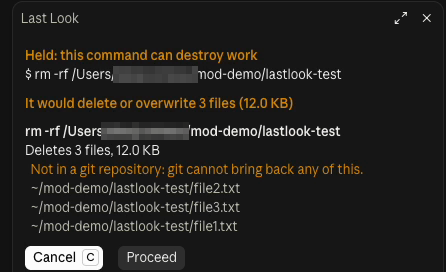
119 passingnone01Review recognized destructive commands before they run
Last Look holds recognized destructive Bash and Monitor commands for an impact review. Cancel is the default; Proceed allows the intended command to continue to Claude Code’s normal permission check.
When to use it
- Catch a recursive delete aimed at the wrong directory.
- Review a destructive git operation before losing local work.
- Check an existing-file redirection before it overwrites something important.
Try it in your session
Let the automatic hold appear during ordinary work. Do not run a destructive command to demonstrate it.
Inspect the recognized operation and measured impact. Missing tools can leave an unmeasured hold.
Choose Cancel if the target is wrong, the impact is unclear or the action is not intended.
Choose Proceed only after reviewing the intended operation. Normal Claude permission checks still apply.
Choose the behavior
In /config, choose Last Look. Set alwaysAllow to an empty string to hold every recognized command. Its default directories are shown below. Allowance applies only to literal recursive rm targets entirely under those directories, not git, find or redirection.
alwaysAllowReviewed default:dist,build,.next,coverage,node_modules/.cacheExample choice:(empty string)- An empty field disables directory allowances; it does not broaden command recognition.
Where it works
Terminal and Desktop hold UI is defined in the reviewed version. POSIX tools are the best fit for impact measurement. A no-window run denies a recognized hold.
Check current platform versions and installation guidanceKnow the limits
- No model calls or network requests of its own. Impact checks do not make it a sandbox.
- Scripts, interpreters, unknown syntax, ordinary nonrecursive rm and non-shell writes can escape recognition.
- An allowance is not blanket permission to delete anything in a similarly named path. It covers only recognized literal recursive rm targets under the configured directories.
Reviewed version 0.1.3, source reviewed 2026-10-15. Read the pinned README (8628e8f). This walkthrough describes that version, not a new live Claude Code test. Catalogue updates may describe a newer version.
How it works
Settings
alwaysAllowDefault:dist,build,.next,coverage,node_modules/.cache- Comma list of folders that are fine to delete or overwrite without asking (dist, build, node_modules/.cache). A command passes only when every path it touches is inside one of them.
Hook events
The prompt
Build me a Claude Code mod called "last-look" that holds destructive commands until I approve them and shows what they would destroy. What it catches (Bash tool calls)- rm -r / rm -rf, find ... -delete, git clean -fd(x), git reset --hard, git checkout -- . and git restore ., git push --force (even with --force-with-lease alongside), git branch -D, git worktree remove --force, and redirects that overwrite an existing file (> file). Parse `--` (end of options) in every git rule. Details
Holds destructive commands until you approve, and shows what they would destroy.
Use it
There is nothing to run. When a shell command Claude is about to run (through the Bash tool, or the Monitor tool's command) is one of the destructive kinds below, Last Look holds it before it runs, measures what it would destroy, and asks you. Once a command is recognised as destructive it is always held: measuring only adds detail to the hold and never lets a command through.
- Where it asks. A pane when the terminal has room for one (Claude Code places a pane nobody asked for from 144 columns: docked beside the transcript in fullscreen, inline above the prompt otherwise). On narrower terminals, a band directly above the prompt. The desktop app works the same way.
- What it shows. The command, and for each destructive part of it: every file it would delete with the total size (cut to the room there is, then "and N more"), files with unsaved work highlighted first ("3 files have unsaved work you would lose"), and the commits or branch that would be lost. When its measurement comes back empty or fails, the hold says so ("Nothing found at these paths" for plain paths, otherwise "could not measure: review it yourself"); either way you decide.
- Deciding. Keys you type never approve: the pane and the band never take the keyboard on their own, and Proceed has no hotkey. Click a button, or press ctrl+x tab to move into the pane or band; Cancel then has the focus, so Enter (or
c) cancels. Proceed takes a click, or Tab onto it and then Enter. In the pane, Esc closes it and cancels. While a command is held in the band, the band shows only the hold (other mods' bands are hidden until you decide), so nothing another mod draws can hide its buttons. - After. Cancel tells Claude the command did not run and not to work around it. Proceed lets the command go on to Claude Code's usual permission check and run. A dim line in the transcript records each decision, and the status line says when a command is waiting.
Compound commands are understood: cd web && rm -rf build is measured inside web, and so are subshells, bash -c '...', $(...), sudo, env, quoted paths, ~, $HOME, globs and {a,b} / {1..9} braces.
What it holds
| Command | Measured with |
|---|---|
rm -r, rm -rf, rm -fr, rm --recursive (any flag order) | the files and total size, git status of each |
find ... -delete, find ... -exec rm (also -exec sudo rm, -exec sh -c ...) | the same find re-run as a listing (-delete becomes -print0); never re-run when it holds -fprint, -fls, another -exec, or a test the system find reads differently (-regex, -readable) |
... | xargs rm | held as "could not measure" (its targets come from the previous command) |
git clean -f, -fd, -fdx, -ffdx | git clean -n with the same flags, -f -f included (so nested repositories show), as a dry run |
git reset --hard [ref] | uncommitted changes discarded, commits dropped from the branch |
git checkout -- <paths>, git checkout ., git checkout <file>, git checkout -f, git restore <paths>, git switch --discard-changes | uncommitted changes in those paths |
git push --force, -f, +refspec, --mirror, even beside --force-with-lease (a lease alone is not held) | commits on the remote branch that yours lacks, as of your last fetch |
git branch -D, git branch --delete --force (-- before the names too) | commits that exist only on that branch |
git worktree remove --force / -f | held as "could not measure": it deletes the worktree folder and any uncommitted work in it |
> file, 2> file, &> file, >| file onto an existing file (not >>, not /dev/null) | the file's size and git status |
Every one of these is held even when nothing is found to destroy (rm -rf build with no build, git reset --hard on a clean tree): the hold says what it found. Only two cases run untouched, and only on positive proof that they destroy nothing:
- a redirect (
> new.txt) when the whole command is that one simple command (no&&,||,;,|,&, newline, subshell,$(...)or unquoted here-doc: an earlier part could create the file first), its target is a plain literal path (no$VAR,~, glob, braces,..,$(...)or backticks), and the file system answers that it does not exist. Any other answer (a permission error, a link, a folder, a path it cannot read) holds; - a bare
git checkout <name>(no-f,--force,--, extra paths or other options;<name>a plain token) when git confirms<name>is a local branch, a remote-tracking branch, or the one remote branch it would set up, and no file of that name makes it ambiguous. A git error, a tag or commit, or any doubt holds. (git itself refuses a branch switch that would lose changes.)
Settings
Every setting has a default, so the notice at install about options not yet set is expected; change them in /config.
| Setting | Default | What it does |
|---|---|---|
alwaysAllow | dist,build,.next,coverage,node_modules/.cache | Folders that are fine to delete with rm -r without asking. It never covers find (with -L, -H or -follow it reaches through links), redirects or git. A relative entry matches that run of folder names anywhere beneath the project root (dist matches packages/web/dist, not distro, and never the root itself); an absolute entry matches by prefix. A command passes only when every path it touches is a plain literal path (no glob, braces, $VAR, ~, .. or $(...)) that exists, and both its spelling and where its links lead are inside an allowed folder. Leave it empty to hold everything. |
What it can touch
- Reads: file metadata only (stat, and directory listings to expand globs) for the paths a destructive command names. Never file contents.
- Runs (by argv, no shell, read-only): the system
find(never with-delete,-exec,-ok,-fprint,-fprint0,-fprintfor-fls),du -sk, andgit rev-parse,status,ls-files,for-each-ref(to tell a branch name from a path on a baregit checkout <name>),diff-index --numstat,diff-files --numstat,rev-list,logandclean -n(a dry run). Git runs withGIT_OPTIONAL_LOCKS=0and fsmonitor off, and plaingit diff(which rewrites the index) is never used, so git writes nothing. To count changed lines git reads the changed files' contents. While a command is held it keeps onesleep 1running at a time (PowerShellStart-Sleepon Windows): Claude Code pauses a hook's time limit only while a host call is in flight. - Environment: reads
HOME. - Network: none. Git never fetches, so force-push numbers are as of your last fetch.
- Model calls: none.
- Writes: nothing outside its own session state.
Limits
- A safety net, not a permission system. It reads the command's text, so it does not see:
- commands inside scripts or piped into a shell (
./clean.sh,npm run clean,make clean,echo ... | bash,bash <<EOF,bash script.sh); - a program named only at run time (
$(echo rm) -rf,"$RM" -rf,eval $CMD), shell and git aliases, flags hidden in variables (rm $FLAGS dir); - other interpreters and tools (
python -c,node -e,perl -e,rsync --delete,grm,busybox rm,parallel rm,ssh host rm,docker run ... rm); - other ways to destroy files or history (
mvorcpover a file,sed -i,tee,truncate,dd,git stash drop/clear,git push --deleteororigin :branch,git checkout -B,git switch -C,git rm -r,git reset --merge,git gc --prune, database commands).
- commands inside scripts or piped into a shell (
rmwithout-r(any number of plain files,rm *included) is left alone on purpose, and so are the other one-file-at-a-time tools treated like it:shred,unlink,ln -sfover a file.- Only the Bash tool and the Monitor tool's command are held. The Edit and Write tools are not.
- It measures with the system
find; the shell's ownfind(Claude Code's bundled one, or GNU find) can match a little differently, so a listing is a guide, and an empty or failed one holds as "could not measure". - zsh's
**patterns, and brace expressions past 256 words, are held as "could not measure" rather than guessed at. - Proceed does not skip Claude Code's own permission prompt: in the default mode you may be asked again.
- Force-push measurements use your remote-tracking branches, which may be out of date.
- Sizes are disk usage from
du. Up to 8 destructive parts of one command are measured; any past that are held as unmeasured. Eachfindordugets 8 seconds. - Your home folder,
/and top-level system folders are never walked: they are held with a plain warning instead. - With nobody to ask (a
claude -prun) a destructive command is denied. In a session drawn only on mobile or VS Code where the pane cannot be placed, it is denied too, and the reason says so. - The band gives way while a Claude Code survey holds it; the pane does not.
- macOS and Linux. On Windows,
findandduare usually missing, so commands are held as "could not measure". - A held command waits as long as you do. Interrupting the turn (Esc at the prompt) stops it.
- Two paths are verified by reading the code, not by tests (the test kit cannot raise them): closing the pane by hand or Esc counts as Cancel, and interrupting the turn denies the held command.
- With several holds queued, if you move the focus onto Proceed (Tab) and press Enter, the next hold may draw with the focus still on its Proceed: read each hold before pressing Enter again. Not verified live.
Built from a prompt
This mod was built from prompts/last-look.md.
Pairs well with
Follow modmyclaude for new mods: TikTok · Instagram · YouTube · X · Threads · Facebook