Mulligan

A do-over for risky shell commands: it saves your files first, and /mulligan puts them back.
91 passingnone14Restore saved project files
Mulligan saves project file snapshots before recognized destructive shell commands in Claude Code. Restore saved files after review; databases are not covered.
How it works
Slash commands
/mulliganList the do-overs saved before destructive commands, and put one back
Settings
enabledDefault:true- Switch mulligan off without uninstalling it. The modmyclaude hub flips this too.
alwaysDefault:- A pattern (a regular expression, case-insensitive; | between several) for commands that should always save the whole project first, such as 'prisma migrate|npm uninstall'. Leave empty for none.
ignoreDefault:- A pattern for commands that never take a snapshot, such as 'rm -rf (dist|build)'. Leave empty for none.
capMBDefault:200- A snapshot of files larger than this is skipped, and the command runs without a net. 1 to 5000.
Hook events
Details
A do-over for risky shell commands: it saves your files first, and /mulligan puts them back.
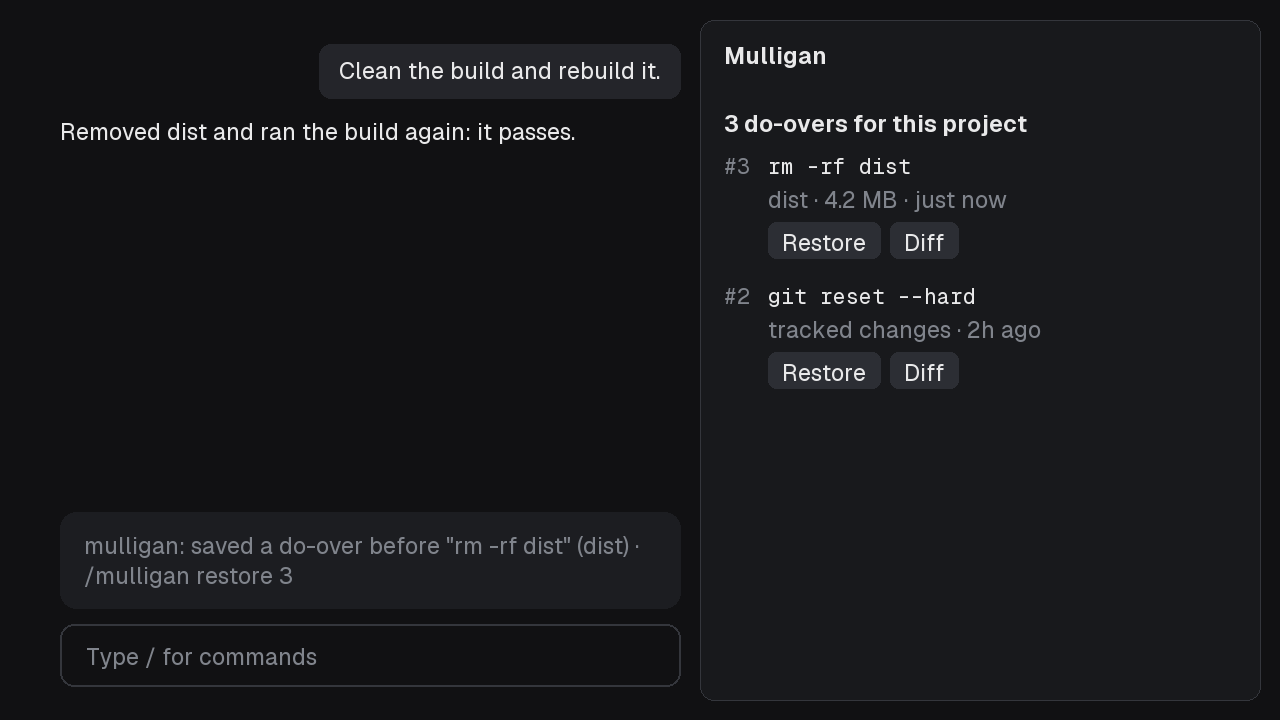
mulligan: saved a do-over before "rm -rf dist" (dist) · /mulligan restore 3

3 do-overs for this project
#3  rm -rf dist                                   [Restore] [Diff]
    dist · 4.2 MB · just now
#2  git reset --hard                              [Restore] [Diff]
    tracked changes · 2h ago
Use it
Nothing to set up. Claude Code's /rewind puts back the files Claude edited with its own tools; it does not undo what a shell command did. Mulligan covers that:
- Before a destructive Bash command runs, it saves what that command can destroy:
rm -r,find ... -delete,xargs rmand a redirect over a file (> notes.md): the paths they name.git reset --hard,git checkoutorgit restoreover changes: your tracked files as they are, as a git commit object (git stash create, which moves no branch and leaves the stash list alone).git clean: the untracked files git lists (not the ignored ones).- A target only known as it runs (
rm -rf "$OUT",rm -rf **): the whole project, without.gitandnode_modules.
- Once the command ran, a dim line says a do-over exists for a few seconds. A command that another mod held or refused leaves no snapshot.
/mulliganlists this project's snapshots, newest first, with what each holds and when.- Restore asks first: Yes, restore writes the saved files back over what is there now, and deletes nothing newer. Claude is then told the files changed under it and to re-read any file before editing it.
- Diff shows what differs now from a snapshot: files deleted since, and files changed.
The same commands last-look holds take a snapshot, and nothing else: a listing, a test run, a single-file rm, a push or a branch delete never does.
| Command | What it does |
|---|---|
/mulligan | The list, in a pane |
/mulligan restore <n> | Snapshot n, waiting on your confirm press |
/mulligan diff <n> | What differs now from snapshot n |
/mulligan drop <n> | Forget snapshot n and empty its archive (only when you type it) |
"Only when you type it" means typed by you in the terminal, the desktop app or Remote Control. A program you run that drives Claude Code through its SDK counts as you too, since the desktop app sends that way; another mod, a peer session or Claude running the command is refused.
Settings
Every setting has a default, so the notice at install about options not yet set is expected; change them in /config.
- On: on by default. Off, Mulligan saves nothing before any command (no git, no tar, no file written) and draws no line;
/mulligansays it is off./mulligan restore <n>still puts back a do-over saved while it was on, after the same confirm: those are your files, and turning it on just to reach them would start saving again, which can reuse the oldest slot. A flip never deletes a do-over./configor the modmyclaude hub flips it, live. - Always save before commands matching: a pattern (a regular expression, case-insensitive;
|between several) for commands that should save the whole project first, such asprisma migrate|npm uninstall. - Never save before commands matching: a pattern for commands that never take a snapshot, such as
rm -rf (dist|build). - Largest snapshot (MB): default 200. A bigger one is skipped, and the line says the command ran without a do-over.
What it can touch
- Writes: archives and a small index (each snapshot's command text, time and size) under
~/.claude/mulligan/<project key>/(or underCLAUDE_CONFIG_DIRwhen set): ten slots per project, reused in turn, never more. The key is a hash of the project's path. Each archive holds copies of your project's files, so anything in them (a.envamong them) sits there too, in your home folder only. - Runs:
git rev-parse,git stash create,git ls-files,git diffand, on a restore you confirmed,git restore --overlay, all with git's optional locks off, so it never takes the index lock under Claude.tarto make, list and unpack archives, andmkdirandmvinside its own folder. It never runsrm, never moves a branch, never touches.gitbeyond the objectsgit stash createadds. - Reads: each Bash command's text (to see whether it destroys files), the shell's current folder, your project's files when it saves them.
- Tells Claude: after a restore, one note that the files changed and to re-read before editing. Nothing else:
/mulligananswers in a pane and toasts. - Network, model calls: none.
Limits
- Files in this project only. A database, a remote, a package registry or anything outside the project folder is not covered, and it says so when a command reaches outside.
- Ignored files are not saved by
git clean -x; the line says so. - A command that fails, or one git refused, still keeps its snapshot: a failing
rm -rfcan delete most of what it named before it stops. - A restore puts back what the snapshot holds. A file the command created is not removed, and edits made since to a restored file are written over (Diff shows them first).
- Restoring tracked changes needs git 2.23 or newer (
git restore). - Saving reads the files it copies before the command runs; a large tree can add up to 20 seconds to that command, and a tree over the size limit is skipped.
- Snapshots of tracked changes are git objects no branch points to. git keeps them for two weeks by default before a cleanup may remove them.
- The pane, the line and the restore are checked through the engine's test kit on the terminal and desktop surfaces, with git and tar stood in for; a real restore on a scratch project is part of the overnight check.
Built from a prompt
This mod was built from the Mulligan prompt.
Pairs well with
Follow modmyclaude for new mods: TikTok · Instagram · YouTube · X · Threads · Facebook