Wardrobe

Restyle Claude Code live, including colourblind-safe and high-contrast themes.
Automated test evidence
Wardrobe v0.1.1 passed strict plugin validation and 534 automated tests, with 0 failures, in the recorded run on 28 October 2026 (UTC). The run used Claude Code 2.1.293 on Ubuntu 24.04 and exercised the engine's test kit. It was not a live Desktop rendering or accessibility check. Type-checking was skipped because engine type declarations were unavailable.
Wardrobe styles Terminal and local Desktop Code. Its VS Code and mobile tests check that it leaves those surfaces unchanged; they do not establish styling support there.
How do I choose a theme or costume?
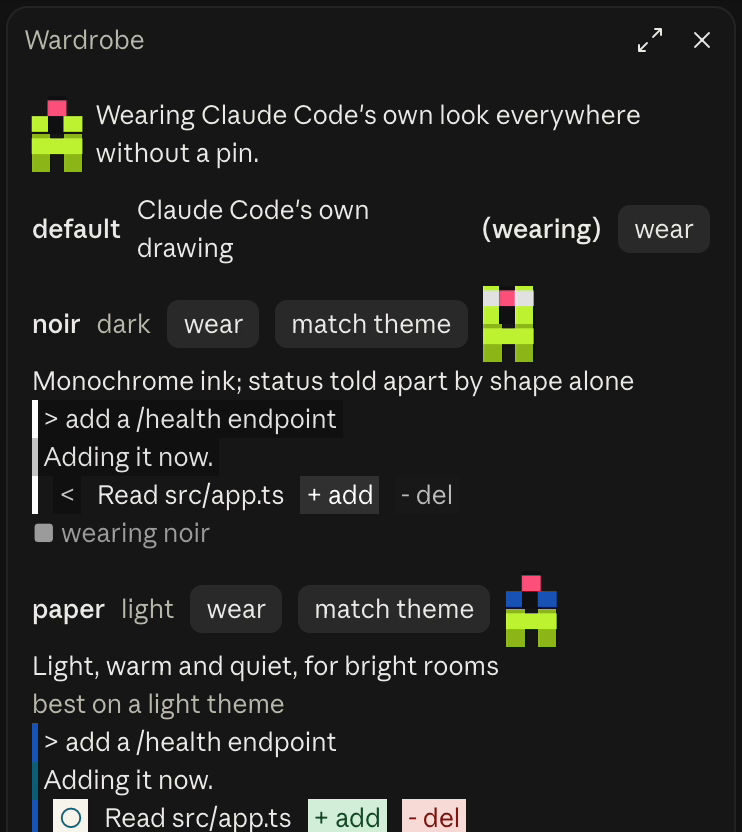
Change Claude Code's working view with themes and seasonal costumes for Bolt. Supports Terminal and local Desktop Code; the Desktop window, VS Code and mobile stay unchanged.
With Wardrobe installed, run /wear to open its gallery and choose a theme or costume for Bolt. Run /wear season to follow the seasonal calendar, or /wear default to restore Claude Code's drawing.
As one seasonal option, /wear halloween selects the Halloween theme and Bolt's witch-hat costume. The seasonal calendar chooses it from October 15 through November 1 using your local date.
Wardrobe v0.1.1 styles the terminal and local Desktop Code session. It leaves VS Code and mobile drawing alone, and does not restyle the Desktop window or sidebar. Read the Wardrobe guide for matching a terminal theme and restoring settings.
How it works
Settings
dayThemeDefault:paper- The theme /wear auto wears by day.
nightThemeDefault:tokyo-night- The theme /wear auto wears by night.
dayStartsDefault:07:00- When auto mode switches to the day theme, 24-hour HH:MM local time.
nightStartsDefault:19:00- When auto mode switches to the night theme, 24-hour HH:MM local time.
Hook events
The prompt
Build me a Claude Code mod called "wardrobe" that restyles how Claude Code draws its work, switchable live. What it does- /wear <theme> switches theme instantly, and shows a themed band above the prompt for a few seconds so the switch is unmistakable: the theme's background colour, its mark, "wearing <theme>", its tool icons, and the mascot in that theme's costume.- /wear with no argument opens a gallery: a card per theme with a sample tool row drawn in that theme, its diff chips, the mascot in costume, and a "wear" button.Choose a look, keep a way back
/wear- Preview the gallery. Use
/wear paper --matchfor a light terminal look or/wear colorblindfor shape and color cues. - Use
/wear pinto keep the current choice for this startup folder. Worktrees and subfolders have separate pins;/wear unpinreturns to the global choice. - Use
/wear defaultto restore Claude Code's drawing. Desktop's frame, sidebar and fonts are not restyled.
Details
Restyle Claude Code live, including colourblind-safe and high-contrast themes.
Use it
| Command | What it does |
|---|---|
/wear | Opens the gallery: a card per theme with a sample tool row drawn in that theme, its diff chips, Bolt in the theme's costume and a wear button; the one you wear is marked. Close it with its close mark or ctrl+x x. |
/wear <theme> | Switches now. Rows still live on screen redraw in the new look, and the switch band shows the theme above the prompt for six seconds. |
/wear auto | A day theme by day and a night theme by night (see Settings). |
/wear season | The seasonal pack the calendar calls for, re-checked daily (see Seasonal packs). |
/wear pin | This project keeps what it wears now; other projects keep the global choice. While pinned, /wear <theme> changes this project's pin. |
/wear unpin | This project follows the global choice again. |
/wear <theme> --match | Wears the theme and sets Claude Code's own theme setting (the /theme menu) to the built-in nearest it: a light look on a dark theme turns the theme light, keeping a daltonized or ansi variant. Your own theme is remembered. From the desktop app this changes the terminal's theme; the app keeps its own look. |
/wear match | The same for the theme worn now. The gallery's match theme button does both at once. |
/wear default | Back to Claude Code's own drawing. After a match, Claude Code's theme goes back to the one you had, unless you changed it yourself since the match: then your choice stands. |
Each command answers in a toast (an unknown theme's message stays longer). Nothing /wear says is added to the conversation, so it costs no tokens and never reaches the model.
Themes: noir, paper (light), tokyo-night, dracula, catppuccin, solarized, nord, high-contrast, colorblind, and the seasonal packs halloween, christmas, spring (light), summer, autumn. Short forms work too: drac, hc, colourblind, tokyo night, xmas, fall, spooky, and any prefix that names one theme alone (sp is spring, su is summer).
Every look also ships as a Claude Code theme file (themes/<look>.json), listed in /theme as "<Look> (wardrobe)". --match prefers it, so in the terminal the input box border, your message background, the text and the diff colours follow the look too; the desktop app keeps its own theme.
What changes, on the terminal and in the desktop app:
| Where | What wardrobe draws |
|---|---|
| Tool rows | A one-cell stripe in the theme's accent, the theme's icon for the kind of tool (shell, read, edit, write, search, web, agent, todo, MCP), Claude Code's own row, then a status glyph and, for a finished call, the time since Claude asked for it (any wait for your approval included). |
| Folded tool groups | The stripe, one icon per call before the count line; a failed call in the error colour. |
| Diff cards (Edit, Write) | Numbered lines in the theme's add and remove colours, with a +N -N summary. |
| Small shell output | A themed card; stderr lines are marked !, not only coloured. |
| Spinner | The theme's suffix after the word (never over Claude Code's own status message); on a terminal 60 columns or wider, a chip saying what the turn is doing (thinking, writing, using tools). |
| Turn duration | A themed Baked for 3s line (the terminal draws this line; the desktop has its own footer). |
| Above the prompt | The switch band, for six seconds after /wear (see below). |
Seasonal packs
Five themes made for a time of year, each with its own mark and icons: halloween (pumpkin orange, violet and bone white on near-black, mark ☾), christmas (holly green, berry red, snow white and gold on deep pine, ❄), spring (a light theme: fresh green, blossom pink and sky blue on cream, ❀), summer (sun yellow, sea teal and coral on deep navy, ☼) and autumn (amber, rust, moss and cream on dark brown, ❧). Every pair they paint meets the same 4.5:1 bar as the other themes.
/wear season picks one by the local date and is stored like auto: wardrobe re-checks the calendar once a minute, so the pack turns over at midnight on its own, and /wear names what it wears now and why.
| Dates | Wears |
|---|---|
| Oct 15 to Nov 1 | halloween |
| Dec 1 to Jan 6 | christmas |
| Jan 7 to the end of Feb | nord (the frost theme; the rest of winter has no pack of its own) |
| Mar 1 to May 31 | spring |
| Jun 1 to Aug 31 | summer |
| Sep 1 to Nov 30, Halloween aside | autumn |
Bolt in costume
Bolt, the modmyclaude mascot, wears each theme: in the gallery beside every card, beside the line that names what is worn, and in the switch band. A costume is an accessory drawn over the sprite, never a change to it: a witch hat for halloween, a santa hat for christmas, a flower crown for spring, sunglasses for summer, a beanie for autumn, a cape and fangs for dracula, cat ears for catppuccin, a headband for tokyo-night, a fedora for noir, reading glasses for paper, a sun visor for solarized, a beanie with a pom for nord, a bow tie for high-contrast; colorblind leaves Bolt plain. Every costume takes at most three colours, all from the theme's own palette, keeps the antenna light clear (each hat has a notch around it), and never uses Bolt's own pink or blush. tests/costume.test.ts holds every one of those rules for every theme and pose.
The switch band
For six seconds after /wear <theme> (and after /wear auto or /wear season resolves to a theme) a band above the prompt shows the switch: one row filled with the theme's background, carrying its mark, wearing <theme>, its five icons, and Bolt in the theme's costume at the right when the band is 60 columns or wider. It draws under any other mod's band, never while a survey holds the band, and goes away by itself. /wear default raises none.
Accessibility
high-contrast: every colour pair wardrobe paints is at least 7:1 (WCAG AAA).colorblind: added lines are blue and removed lines orange, never red and green; tool icons differ by shape (triangle, disc, diamond, square, cross, bars).- Every other theme, the seasonal packs included: at least 4.5:1 (WCAG AA).
tests/themes.test.tschecks every pair of every theme. - Every theme gives each tool kind and each status its own glyph, so colour is never the only cue.
- Every coloured span is painted on the theme's own background, so the contrast holds whatever your terminal's background is.
Settings
Every setting has a default, so the notice at install about options not yet set is expected. Set these in /config. A time wardrobe cannot read falls back to its default, and /wear names it.
| Setting | Default | Meaning |
|---|---|---|
dayTheme | paper | What /wear auto wears by day. |
nightTheme | tokyo-night | What /wear auto wears by night. |
dayStarts | 07:00 | When the day starts, 24-hour local time. |
nightStarts | 19:00 | When the night starts. A day that crosses midnight (20:00 to 06:00) works. |
What it can touch
- Its own store: the global choice, the per-project pins (keyed by the path of the folder the session started in), and, once you have matched a theme, the Claude Code theme you had before and the one it set, so
/wear defaultcan put yours back and can tell when you changed it since. - For the session, in memory: each tool call's start and end time, for its row.
- Reads the project root, the attached surfaces, the clock, and Claude Code's own theme setting (the
/configtheme row) at session start, before a match and before a restore; it also notices when you change that setting. - Writes Claude Code's theme setting only when you ask:
/wear <look> --match,/wear matchand thematch themebutton set it, and/wear defaultsets it back to the one you had. No files, no processes, no network, no model calls. It never refuses or changes a tool call: its tool hook only notes when a call starts and ends.
What a look changes, and what it cannot
It changes: tool rows and folded groups, diff cards and small shell output, the spinner's word and suffix, the turn line, the switch band, your prompt rows, Claude's reply rows and command output rows (a stripe, and the look's background where it may paint), the wearing <look> label in the prompt footer, the /wear gallery, and, only when you ask with --match or the match theme button, Claude Code's own theme: in the terminal the input box border, your message background, the text and the diff colours then follow the look.
It cannot change: the desktop app's window frame, sidebar, input box, page background and fonts; Claude Code's own text colours inside the rows, which follow /theme unless you match it; the spinner's word, which keeps Claude Code's own colour; permission dialogs, errors, diffs over the size limits and long shell output, which Claude Code draws itself; the terminal emulator's background and font; VS Code and the mobile app; rows already printed on the terminal's main screen; and a light look's panels on a dark app, which stay stripe-only until the theme is matched.
Limits
- It restyles what Claude Code lets a mod draw. Claude Code's own text keeps its colours: the tool's own row inside wardrobe's stripe, icon and status, Read and Grep results, the prompt, dialogs and the transcript all follow Claude Code's own
/theme. Wardrobe styles around them (the stripe, the chips, the band, the gallery); pick a matching/themefor the same reading everywhere. - Tool rows wrap Claude Code's own row instead of replacing it, so expanding a row and its output keep working.
- Claude Code draws these itself: errors, diffs over 120 lines or 8,000 characters, binary diffs, edits held for review, and shell output over 8 lines or holding a control character other than a colour code (a progress bar's carriage return, a bell, NUL).
- Untrusted text it draws (paths, diff lines, shell output, settings) is cleaned first: colour codes are dropped and any other control character shows as U+FFFD, since Claude Code refuses a drawing that holds one.
- Where another mod draws its own tool result or turn line, wardrobe steps aside and that drawing stands. Tool rows, tool groups and the spinner wrap whatever is beneath them.
- A pin belongs to the folder the session started in: a subfolder or a worktree of the same repo is pinned separately.
- On the terminal's main screen, rows already printed keep their look; new rows, and everything in the fullscreen view, follow
/wear. - VS Code and the mobile app are not restyled;
/wearsays so when one is attached. - Where nothing draws a toast or a pane (a
claude -prun),/wearwrites its words and the list to the log instead. - Auto mode and season mode check the clock once a minute, so a switch can land up to a minute late. A choice made in another session reaches this one the same way.
- The switch band is a plain row above the prompt: it never covers a safety hold or a survey, and Bolt is left out of it under 60 columns.
- Tool calls made before wardrobe loaded show no time, and a refused or failed call shows its status but no time.
- Not verified: the paint itself in a real terminal and in the desktop app. The tests check the drawn trees against each surface's rules, not pixels.
Built from a prompt
This mod was built from prompts/wardrobe.md.
Pairs well with
Follow modmyclaude for new mods: TikTok · Instagram · YouTube · X · Threads · Facebook