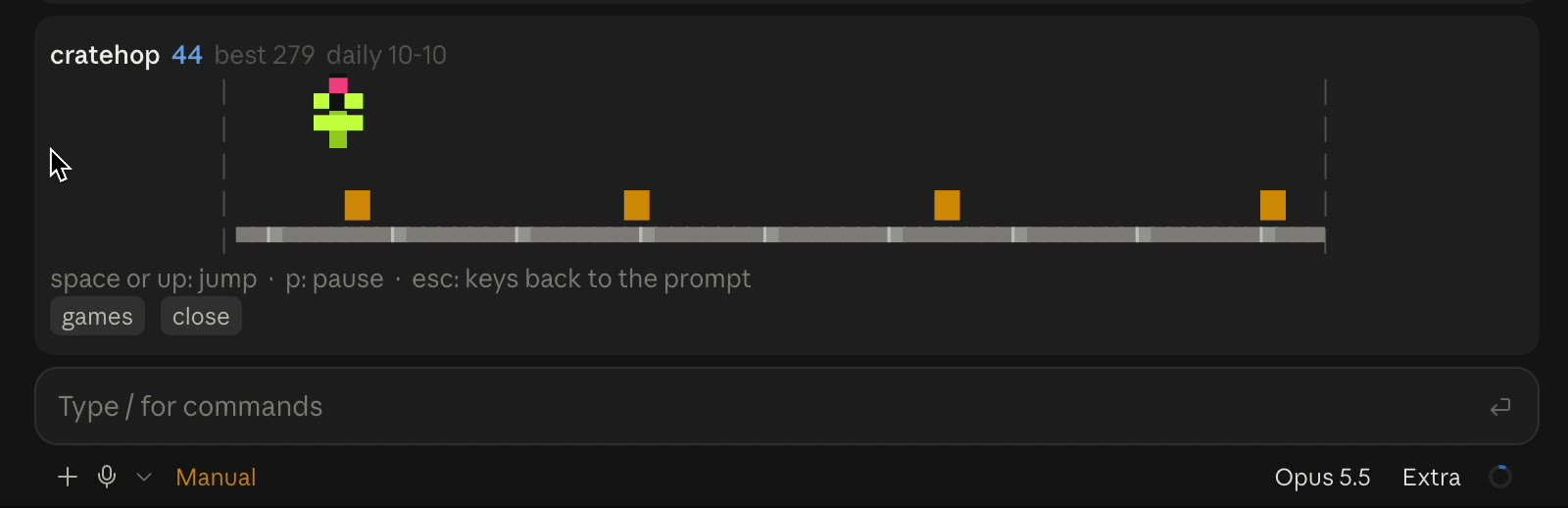
Claude works, you play. The whistle blows the moment it needs you.
Four small games live in the band above your prompt. The moment Claude needs
you - a permission prompt, a question, an input request, or the turn ending -
the game freezes, the board closes so your keys go back to the prompt, and a
line says whistle: Claude needs you. When Claude gets going again you get a
3-2-1 and the same run, exactly where you left it.
Use it
| Command | What it does |
|---|
/halftime | Opens the picker, with your one-line scorecard. |
/halftime cratehop (or tailchase, merge, sweep) | Puts that game's daily board above the prompt. Add practice for a random board. |
/halftime auto | Turns auto on or off (/halftime auto on, /halftime auto off). |
/halftime off | Closes the band; a run in play is paused, and the picker offers it back. |
The command runs at once even while Claude is mid-turn. In the terminal and the
desktop app its replies are short toasts and nothing is added to the
conversation, so Claude never reads them. VS Code and the mobile app have no
band, so there the reply is the command's row: your one-line scorecard.
A board takes your keys only when you click it. No mouse (the classic
terminal renderer sends no clicks)? Press ctrl+x tab to focus the band, then
the letter keys drawn under the board (w a s d, x f, p to pause). Esc
hands the keys back to the prompt. No game ever uses Enter, y, n or a digit, and the board never
passes those keys on, so a stray press can never answer one of Claude Code's
prompts.
The games (all original):
- cratehop - a courier runs on its own;
space, up, w or a click jumps the crates. The first ten seconds are gentle: a slow start (10 cells a second), a 4.5 second run-up to the first crate, low crates and wide gaps. Then it speeds up by about 0.18 cells a second every second, to a cap of 24 cells a second about a minute and a half in, and holds there. Every gap is a full jump plus a quarter second to react, every crate leaves a timing window of 250 ms or more, crates hurt a little less than they look (a graze is safe), and a jump pressed up to 120 ms before landing fires on touchdown. A crash bursts red where the courier was. Score: distance.
- tailchase - steer a snake on a wide, short field with the arrows,
wasd or hjkl. The edges wrap; biting yourself ends the run. It starts slow (about 4 steps a second) and speeds up a little with every pip, to a cap of about 8 a second at 37 pips. A pip only ever lands on a cell your head can reach. Up to three turns wait in line for their step, and a step that would bite is held back for 100 ms, so a late turn still saves you. Score: pips eaten.
- merge - slide a 4x4 board of lettered tiers (arrows,
wasd, hjkl); two equal letters make the next one, once per tile per move. It deals two A's in one line, so the first slide already makes a B; only A's are dealt for the first 12 moves, then an occasional B creeps in. A game can end, but never before move 14. Score: points.
- sweep - a 16x6 mine field with 12 mines. Arrows move,
space or x opens, f flags, or click / right-click a cell. It opens with a safe pocket, and every board is checked by a solver before it is dealt: the single-cell rules plus the subset rule clear it from the opening, so you never have to guess. Score: seconds to clear (lower is better).
Every game's field is drawn centered between two dim rails, on a clear background: solid blocks for the snake, crates and tiles, raised slabs for sweep's closed cells. Every game: p pauses and resumes, r starts again after a run ends.
Daily boards. Each game's daily board comes from the date alone, so
everyone gets the same board that day. After a run, the result line reads like
halftime daily 10-09 · cratehop 412 · played 3m of a 7m turn, with a copy button.
Auto mode offers a game (a clickable line) once a turn has run 10 seconds.
It never starts a game or takes your keys by itself.
The whistle blows for: a permission prompt (from the main conversation or
a subagent), a question from Claude (AskUserQuestion), an input request from a
tool (MCP elicitation), and the main turn ending. Subagents starting and
finishing never pause or resume anything. The run comes back with a 3-2-1 when
the loop that asked moves on, or when your next turn starts; after a turn ends
you can also press play on.
The run also pauses by itself when a survey takes the band, when you start
typing at the prompt, when you open the picker or close the band, and when a
realtime game (cratehop, tailchase) gets no key or click for 20 seconds. A board
that comes back after any of these waits for your click.
Settings
- On: on by default. Off, Halftime draws nothing, blows no whistle and keeps no timer;
/halftime says it is off. Turned off mid-game, the run is paused and the band closes, as /halftime off does; turned back on, /halftime offers the run back. /config or the modmyclaude hub flips it, live.
- Auto mode (
/halftime auto) and your last game are remembered across sessions; the picker's daily / practice toggle lasts the session.
What it can touch
- Its own store only (Claude Code's per-plugin store): personal bests
(
best:<game>), today's daily best (daily:<game>), totals (play time,
play time while Claude worked, runs), the auto switch and your last game.
- The clipboard, only when you press
copy.
- No files, no processes, no network, no model calls.
- Timers run only while a game is played: the board's frame clock while a
realtime run is in play and holds your keys, and a 3-second countdown. A
paused or closed game ticks and redraws nothing. Auto mode sets one 10-second
timer per turn.
What its hooks do
Halftime decides nothing for you and changes no setting. Each hook watches and
passes the event on unchanged:
- The On switch (
config.set, halftime.enabled only): passes the change on
to Claude Code, then reads the outcome to stop or restart its own drawing and
timers. It never refuses a change and touches no other setting.
- Permission prompts, input requests and notifications
(
classic.PermissionRequest, classic.Elicitation, classic.Notification):
blow the whistle, pausing the game, when Claude needs you. They decide no
permission and answer nothing.
- A question Claude asks you (
tool.call, AskUserQuestion only): pauses
the game while the question is on screen. It never answers or denies it.
- Claude moving on (
classic.PostToolBatch): starts the 3-2-1 back to your
game once the loop that needed you is working again.
/halftime is answered inside the mod; no script or process runs.- The game board (
hooks/board.tsx, drawn as a Client): paints the board
and hands your keys and clicks back to the hooks module. It reads
globalThis.crypto only to make a random id for the board on screen, reads
no credential or environment variable, and sends nothing anywhere.
- The tests (
tests/) stand in for Claude Code and for you: they run
/halftime, answer a question or a settings change as you would, and switch
Halftime off and on. None of that runs when Halftime is installed.
Limits
- In the desktop app, a
/halftime sent as the very first prompt of a new session may show "/halftime isn't a command here." The app checks the command before mods have registered theirs; the command still runs, and later ones show no such line.
- Terminal and desktop app only. VS Code and the mobile app have no band
and no board; there
/halftime shows a one-line scorecard instead.
- Starting a game cannot hand it your keys. Claude Code gives the band the
keyboard only on your click or its focus chord (ctrl+x tab), so
/halftime cratehop puts the board up and the run starts on your first
click or key.
- Esc gives no signal to the mod. A realtime run you leave keeps going
until you type at the prompt (it pauses then) or, at most, 20 seconds with
no key or click, when it pauses itself. Those idle seconds never count as
play. Turn-based games (merge, sweep) never tick, so they need no such pause.
- After you answer a permission prompt, play resumes when that step's tools
finish (the API has no "dialog answered" event), or at your next turn.
- A permission prompt another hook settles before any dialog shows (one of
your own settings hooks allows or denies it) still blows the whistle: Halftime
passes Claude Code's answer on without reading it. Play comes back the same
way, when that step's tools finish.
- Two open sessions share bests safely (each save re-reads the store just
before writing and repairs a lower write it finds after), but the store has no
true compare-and-set: two saves in the same instant can still race. Totals are
added the same way and can, rarely, miss a few seconds.
- Copy works in the terminal; a surface without a clipboard path says so, and
the line stays on screen to select.
- The daily board follows your machine's calendar day.
- cratehop's top speed leaves a quarter second to see and answer a crate on a band at least 24 columns wide; on a narrower one the courier sees too little of the course to be fair at the cap.
- Drawing is verified against the plugin test kit, not a real terminal's paint.
Built from a prompt
prompts/halftime.md